How to Maximize the Benefit of a Google Post
If you’re a lawyer or handle marketing for a law firm, you may not even know that Google allows you to post updates to your Google Local (My Business) listing, link to a page on your website and display it on your listing through a “Google Post“. However, this article will inform you of how to create a Google Post and help your law firm get the most marketing mileage out of it.
What is a Google Post?
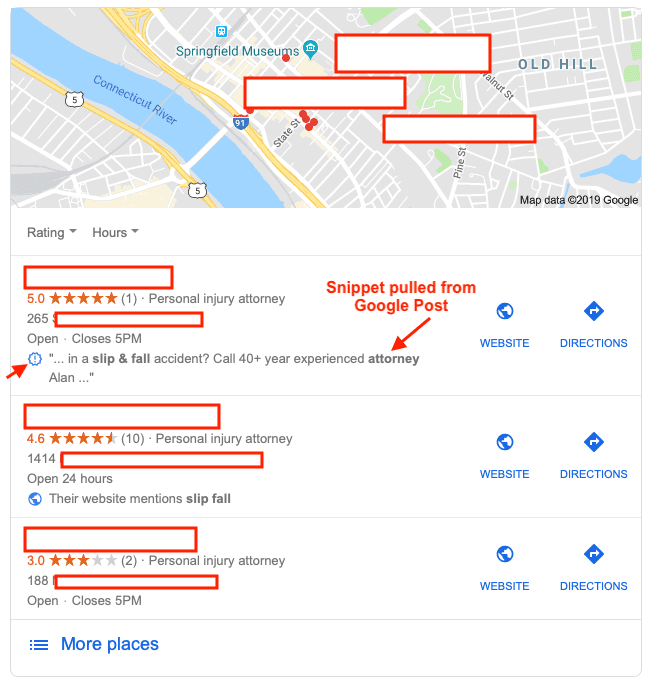
A Google Post is a way to publish an update, event, promotion or information directly within your Google My Business listing, which is visible in your firm’s “Knowledge Panel” when your firm name or attorney name is searched on Google. Your Google Post is temporary and is only visible for 7 days, and snippets from your Post may also be pulled into your results in Google Maps if it is relevant to the User’s search.
Will a Google Post Help With Search Engine Optimization?
If you’re thinking that stuffing a bunch of keywords into a Google Post will skyrocket you to the top of local results, sorry… it won’t. Google Posts won’t help you appear for something you don’t already appear for naturally. Meaning that if you don’t rank for a search phrase or keyword, creating a Google Post won’t help your visibility for that phrase. Also, the links you include on a Google Post carry no SEO value or “link juice”, so you won’t impact a page’s ranking simply by linking to it. Due to the high visibility of a Google Post this is definitely not the place for spam, low quality or “filler” content. Google Posts are up front and center when someone Google’s your firm’s name, or possibly an individual attorney’s name at your firm so you want the content and messaging to be on point & pristine.
However, if you already do rank in the local 3-pack for a search phrase, you can capitalize on this by manipulating… cough, errrrr… “optimizing” your Google Post. Google will extract the keywords from your Post and insert it into a snippet that appears on your business listing (up to approx. 65 characters). This “snippet” area may also pull content from your website, or Google reviews that contain the keywords or phrase that the User has searched.

What Should a Lawyer Publish on Google Posts?
Google Posts are intended to promote time sensitive content, market an event, or make an announcement. Since the post only lasts 7 days, don’t expect a huge influx of traffic or your phone to ring off the hook.
Here are some of the ways we use Google Posts for our clients:
- Promote a 5 star review or award announcement.
- Announce a recent victory in a case.
- Announce a change to your firm (new attorney, phone number or address).
- Link to an article where your firm is featured or quoted.
- Link to a recent blog post or something interesting you’ve published.
- Showcase participation in an event, fundraiser or association.
How Do I Publish a Google Post?
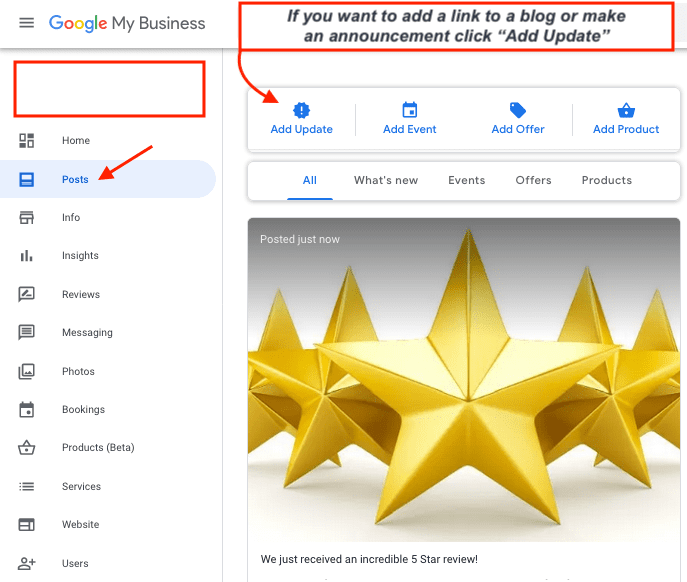
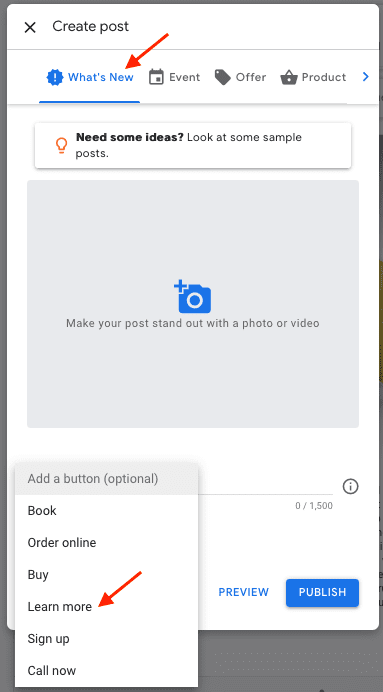
It’s very easy to publish a Google Post if you have access to your Google My Business listing. Simply login, and navigate the “Posts” link on the left hand side. Once you’re in the Posts section, you have the option to add a variety of Google Posts but the one you’ll probably want to use is the “Add an Update” option and post under “What’s New”. This option gives you the ability to post photos or videos, commentary up to 1,500 characters and a link to something if it’s relevant (a blog or article) – we use the “Learn More” link option for that. You can also use the “Call Now” button instead if you’d like to promote getting a phone call at the default phone number listed for the law firm.
|
|
What Happens to a Google Post After It Expires?
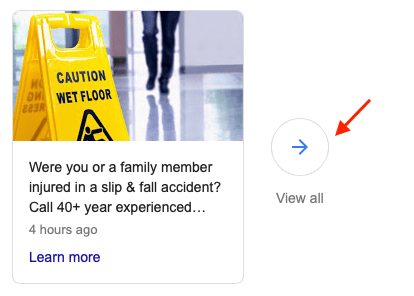
After a Google Post expires it disappears from your Knowledge Panel and the snippets go away, but your past Posts are still visible in chronological order on Mobile. Oddly enough, this is one of those times where the desktop search experience differs, in a bad way, from a mobile device. Currently, the only way you’ll be able to see past Google Posts on desktop is if you have a current live Post – there will be a “View All” icon near your latest post which opens a Google overlay with your past Posts in descending order.
Contact a Law Firm SEO Expert
If you’re a lawyer or manage the optimization or marketing effort for a law firm, contact the lawyer SEO experts at Everest Legal marketing today to discuss how to maximize your visibility on Google and legal directories. We work with solo attorneys, and larger firms to increase traffic and leads from prospective clients when their searching for an attorney and don’t have a referral.
Feel free to comment below on how you use Google Posts and if there’s anything that has worked for you.


President & Founder – Everest Legal Marketing, LLC
Doug Bradley is the Founder and CEO of Everest Legal Marketing. Doug has over a decade of experience specifically in legal marketing, and foremost with expertise in Search Engine Optimization for law firms. Doug has been quoted on numerous websites, co-hosted many MCLE sessions, and has advised law firms of all sizes on the topic of effective marketing and ethical SEO strategies.